

What is IP Whitelisting?
IP whitelisting is a method of controlling network access by allowin…
 July 04, 2025
SAML authentication lets users log in once and access multiple business applications without entering credentials again. It's commonly used in enterprise environments to power Single Sign-On (SSO) systems across cloud platforms.
If you're managing user access across cloud platforms, SAML helps by shifting authentication to a central identity provider. Instead of each service handling its own login, they rely on a trusted source to confirm user identity. This reduces login fatigue, limits password-related risks, and gives your IT team better control over who gets access to what.
SAML has been around for years and is still widely used in organizations that need strong security, simplified user management, and support for multiple platforms and vendors.
If you're new to SAML authentication, we recommend starting with the basics to understand what it solves and why so many businesses rely on it.
SAML (Security Assertion Markup Language) is an open-standard protocol that allows identity data to be exchanged between two systems, typically an identity provider and a service provider. It uses XML to format these identity messages and securely pass login details without exposing passwords.
SAML was built to solve the problem of fragmented authentication. In early enterprise environments, each application managed its own user credentials, making the system harder to scale and secure. SAML changed that by introducing a standardized way for apps to trust a centralized identity source.
This remains useful today. SAML enables Single Sign-On (SSO) across cloud services, lets businesses control access from one place, and removes the need for every application to maintain its own login system.
Understanding SAML's key components is essential before diving into how it works. Each element plays a specific role in making the authentication flow possible.
Now that you're aware of what SAML is and its key components, understanding how SAML authentication functions becomes a bit easier. Here's how the entire process works behind the scenes:
If you're evaluating identity protocols for SSO, you’ll likely come across OAuth and OpenID Connect alongside SAML. While all three deal with access, their roles are different, and choosing the wrong one can create long-term security or integration issues. Here's how they compare.
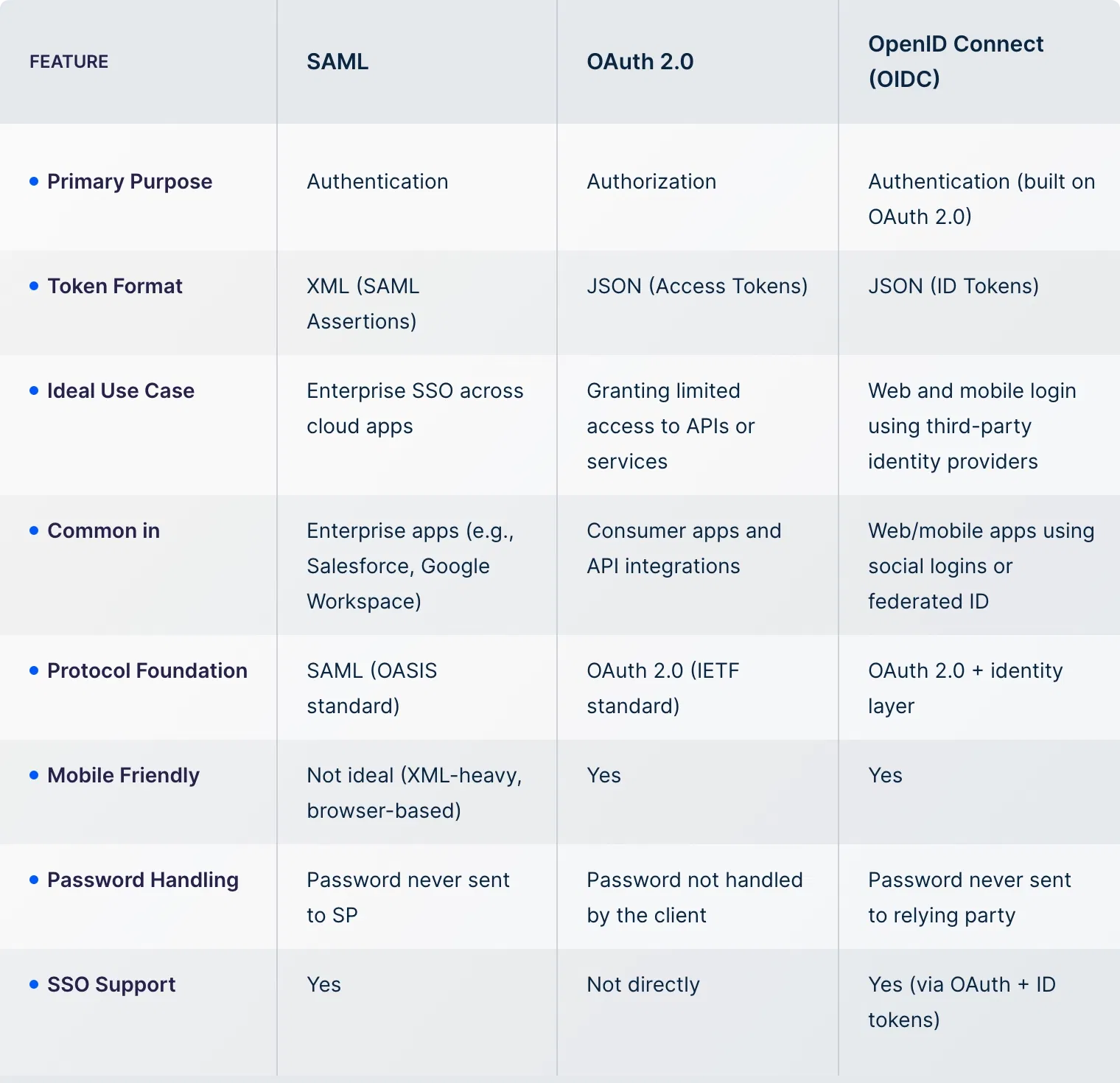
Now that you know how SAML authentication works and how it compares with OAuth 2.0 and OpenID Connect, it's important to understand its pros and cons. This helps you get a complete picture of what SAML offers.
After going through the pros and cons, the final step is to look at where SAML authentication actually fits. These use cases help you decide whether it's the right approach for your business environment.
Individuals also use SAML to access platforms like academic portals, healthcare apps, and HR systems with a single login. It also supports identity federation across departments, partner networks, and temporary user roles.
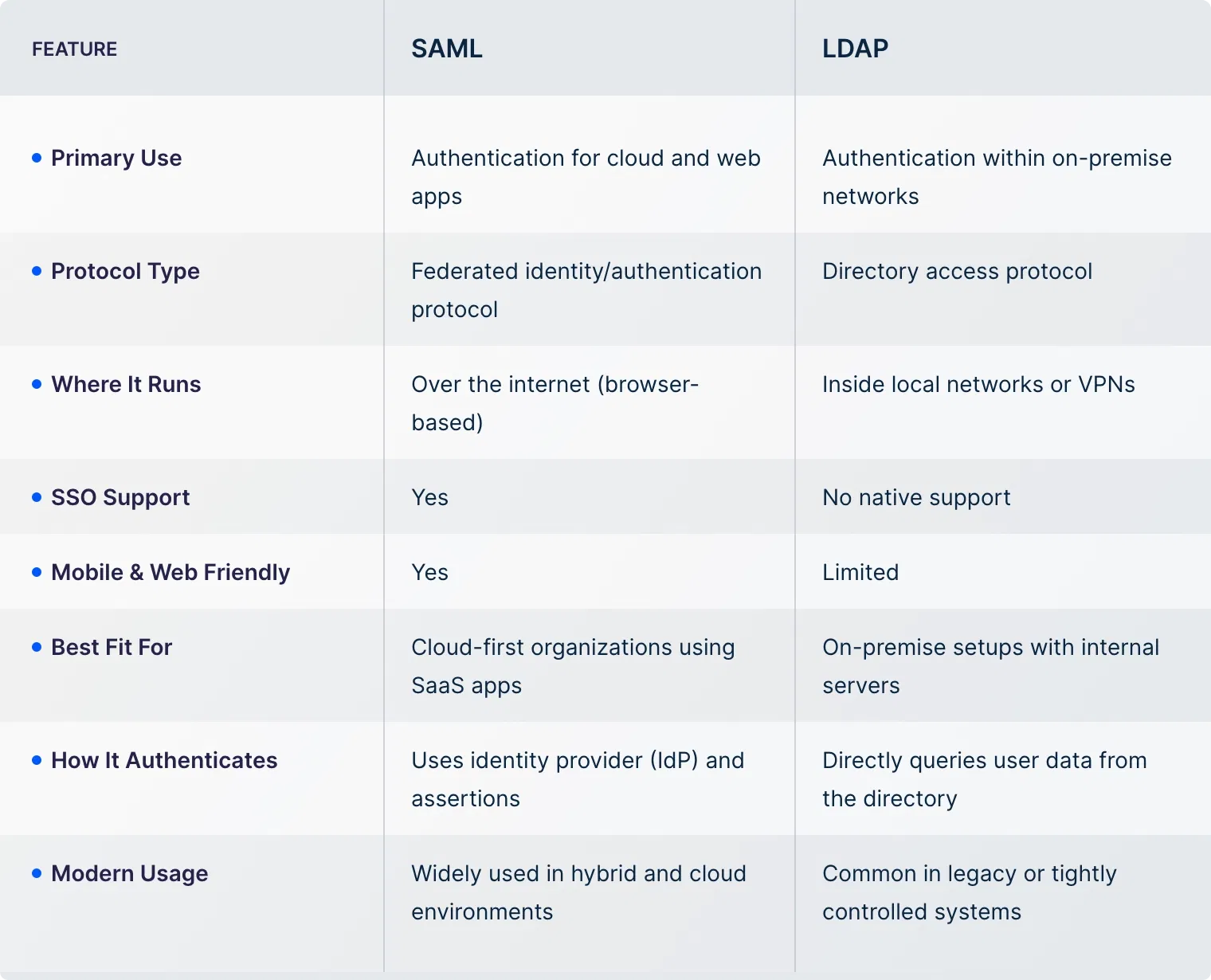
LDAP (Lightweight Directory Access Protocol) is a protocol for accessing and managing directory-based user information, often stored on-premise servers.
While both are used for authentication, they work in very different environments. To break the confusion, we have created a quick comparison that will help you understand which suits your setup.
AT UTunnel offers built-in SAML support so your team can use their existing identity provider, such as Okta, OneLogin, Azure AD, or Google Workspace, to securely access UTunnel. With just a few configuration steps, you can enable Single Sign-On (SSO) and allow users to log in using their enterprise credentials.
We also support SCIM alongside SSO. This lets you automate user provisioning, updates, and removal based on your identity provider, so there's no need to manually manage user accounts inside UTunnel.
If you're deploying secure access at scale, we help you centralize authentication, reduce admin effort, and stay aligned with your organization's access policies.
SAML 2.0 is the most widely used version of the SAML standard. It defines how identity information is exchanged between an identity provider and a service provider.
SAML is used for authentication, not authorization. It confirms who the user is, but it doesn’t define what actions they can perform.
SAML is mostly designed for browser-based applications. While it can work with mobile apps, protocols like OpenID Connect are often more mobile-friendly.
SAML 2.0 is not backward compatible with SAML 1.1. Both systems can coexist, but they require separate configurations.
If the identity provider is unavailable, users won’t be able to authenticate. It’s important to have high availability configured on the IdP side.
Yes, SAML can work with MFA. The identity provider handles the additional verification before issuing the authentication response.
You can configure SAML authentication in the UTunnel dashboard by integrating with identity providers like Okta, OneLogin, Azure AD, or Google Workspace. Support for SCIM is also available to automate user provisioning.
IP whitelisting is a method of controlling network access by allowin…
July 04, 2025
A cloud firewall is a security solution that helps filter and monito…
June 12, 2025
WireGuard VPN is a modern VPN protocol that encrypts your internet t…
June 12, 2025
