

What Is WireGuard VPN?
WireGuard VPN is a modern VPN protocol that encrypts your internet t…
 June 12, 2025
SCIM is a standard that helps you automate user account creation, update, and removal across apps and services. Instead of manually managing access in each tool, SCIM lets your identity system handle it all in one place.
If you're running multiple cloud platforms, managing user access quickly becomes a time-consuming task and increases the risk of mistakes. SCIM connects your identity provider, like Azure AD, Google Workspace, or Okta, with the apps your teams actually use.
This means new employees get the right access on day one. Departing users lose access immediately. And your IT team doesn't need to build or maintain custom scripts to make it happen.
If you're trying to understand SCIM, the key components below form the foundation of its operation. These elements work together to make identity management consistent and scalable across tools and platforms.
Now that you know the key components of SCIM, understanding how it works in identity provisioning becomes easier. The flow is straightforward but powerful when applied to real-world systems.
It starts with the identity provider (IdP), which stores employee details like names, roles, and group memberships. When a new user joins your organization or changes roles, the IdP updates its records with the relevant identity attributes.
Next, these updates are sent to the service providers through SCIM’s REST-based API. The service providers receive this data at their SCIM endpoints and automatically create or modify user accounts to reflect the changes from the IdP.
Finally, when a user leaves the company or no longer needs access, the IdP triggers deprovisioning. SCIM communicates this to all connected apps, which then remove or disable the user account, closing security gaps and simplifying license management.
If you're adopting SCIM, it's important to know what it actually provisions. Beyond just user accounts, it automates how you manage individuals, groups, and workflows across systems. This section breaks it down so you know exactly what to expect before integrating.
SCIM allows you to automatically create, update, or remove user accounts in connected applications based on what's defined in your identity provider. Whenever someone joins, changes departments, or leaves your company, SCIM keeps all systems in sync, without manual updates.
This helps you reduce human error, prevent unauthorized access, and save your IT team from repetitive user management tasks.
Managing permissions individually doesn't scale. SCIM supports group-based provisioning, so users are automatically placed into the right access groups based on their role, department, or location.
When a group changes, SCIM updates access across systems instantly. This way, you don’t have to touch every app manually, as the group logic handles it for you.
Provisioning doesn’t have to involve tickets and wait times. SCIM automates onboarding and offboarding flows in real time. When someone’s status changes in your directory, connected apps grant or revoke access immediately.
That means no delays in getting new hires started, and no lingering accounts when employees leave.
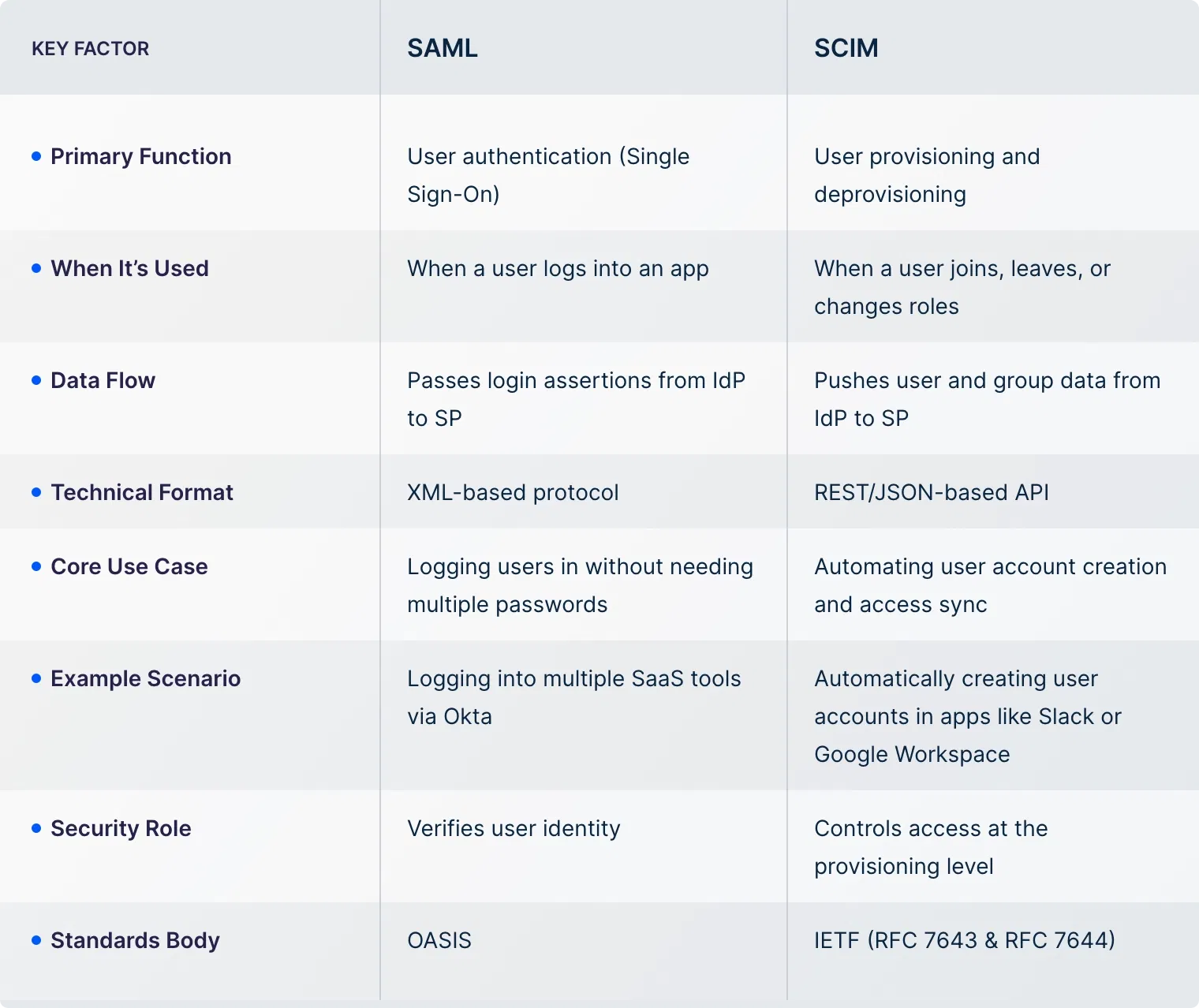
SCIM and SAML are often mentioned together, which can lead to confusion about their roles. Both deal with user identity, but they solve different problems in the access management flow.
SAML (Security Assertion Markup Language) is used for authentication. It helps users sign in to multiple apps using a single set of credentials. On the other hand, SCIM handles provisioning by automating the creation, update, and removal of user accounts across systems.
Here's a comparison table to help you understand the difference between the two:
Before proceeding with implementing SCIM for your business, it’s important to understand its core use cases. This helps you decide whether SCIM is the right fit for your environment and identity management goals.
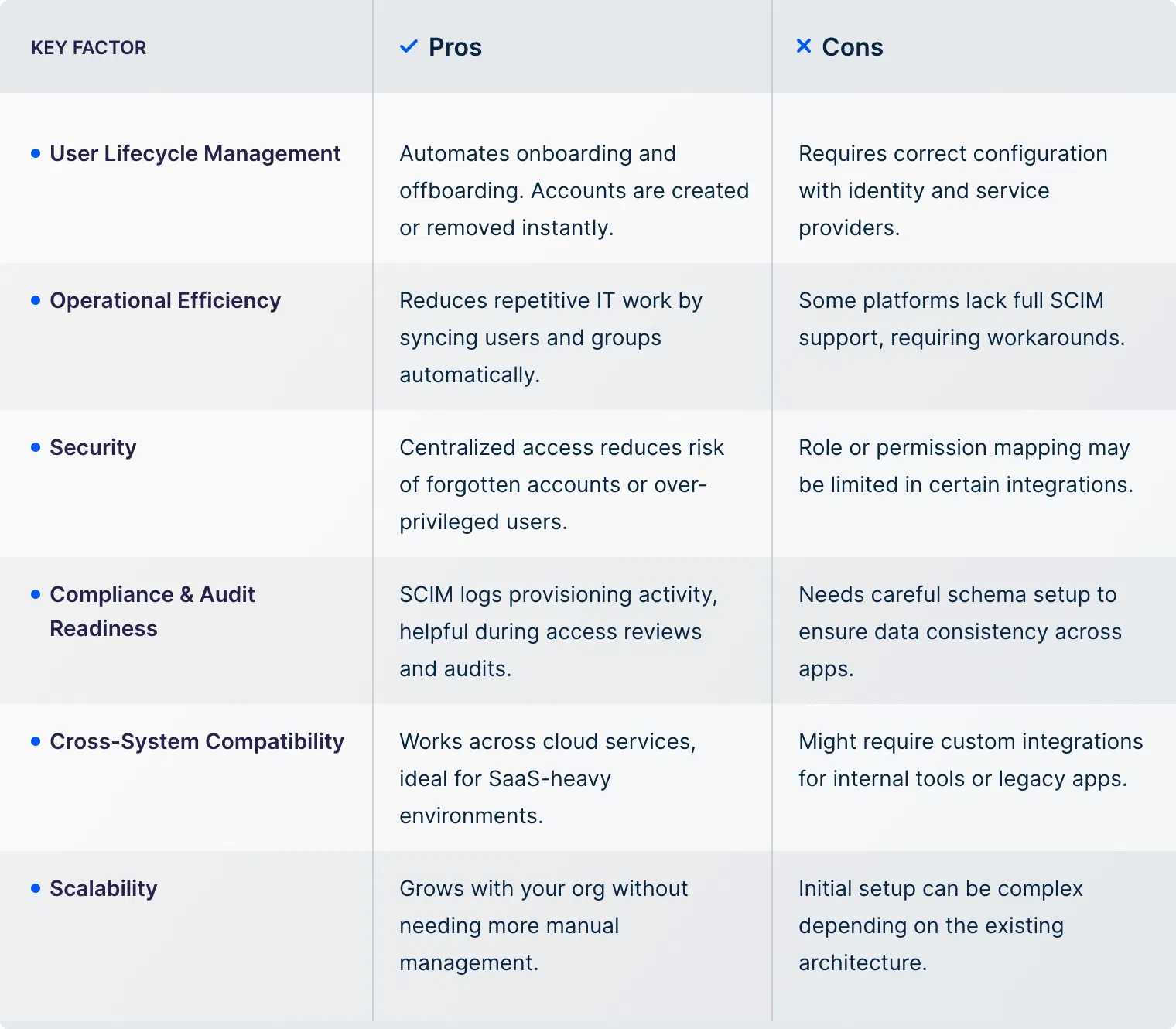
If SCIM seems like a good fit for your business needs, the final step is to weigh its pros and cons. This will help you judge its real-world impact on teams, tools, and ongoing operations.
SCIM provisioning in UTunnel is built to help businesses simplify user management across cloud VPN and access control environments. We don’t just support SCIM. We make it easy to integrate and operate with identity providers you already use.
Here’s what UTunnel offers:
SCIM syncs user data between your identity provider and apps. When a user is added or removed from the IdP, the change is reflected across connected systems automatically, streamlining access and reducing manual work.
Yes, but only if those systems are SCIM-compatible or support API-based integration. SCIM is most commonly used with cloud-based apps, but with the right setup, it can be extended to on-prem environments.
Provisioning creates or updates user accounts in connected systems. Deprovisioning removes access when a user is deleted or disabled at the identity provider level. SCIM handles both to keep systems in sync.
SCIM doesn’t manage MFA directly. However, it works alongside identity providers that enforce MFA policies. SCIM focuses on identity lifecycle, while MFA is handled by the authentication layer.
Start by choosing an identity provider like Okta or Azure AD that supports SCIM. Then, connect it to your business applications like UTunnel, using the SCIM credentials and endpoint details provided by the app.
Use consistent attribute mappings, organize users into logical groups, and test provisioning rules before rollout. Also, enable detailed logging to monitor changes and handle sync issues quickly.
WireGuard VPN is a modern VPN protocol that encrypts your internet t…
June 12, 2025
A cloud firewall is a security solution that helps filter and monito…
June 12, 2025
