

What is SCIM (System for Cross-domain Id…
SCIM is a standard that helps you automate user account creation, up…
 July 04, 2025

IP whitelisting is a method of controlling network access by allowing connections only from specific, trusted IP addresses. Also known as IP allowlisting, it blocks all incoming traffic by default unless an IP is explicitly approved.
This access control strategy helps limit exposure to unknown or unauthorized traffic. By approving only known IPs, it reduces the risk of intrusion and makes it easier to manage who can reach a system or service.
IP whitelisting is often part of a larger security setup. It offers a simple but effective way to enforce strict access rules across networks or applications.
IP whitelisting works by creating a predefined list of approved IP addresses and restricting access to only those addresses. It flips the typical security model by denying all incoming traffic by default and allowing only trusted sources through.
Here’s how it works:
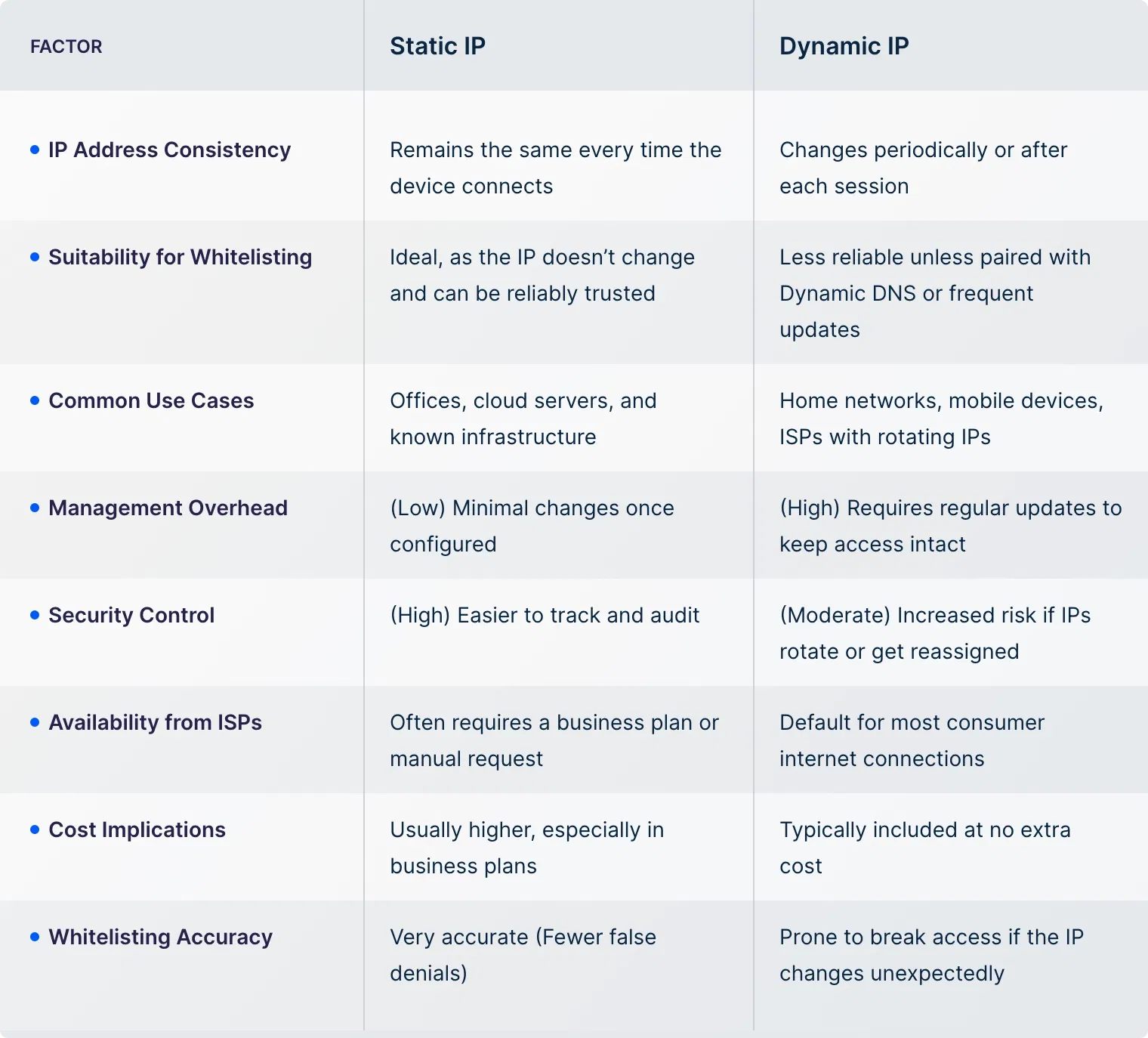
Before we learn more about IP whitelisting, it’s important to understand the difference between static and dynamic IPs.
Many readers get confused about which type of IP can be whitelisted, or whether both can be used at all. Since IP-based restrictions depend entirely on address consistency, knowing how static and dynamic IPs behave helps you make the right choice for secure access control.
Here’s a breakdown to clarify the differences:
If you're implementing IP whitelisting, the first step is to determine whether it meets your access control needs. Below are the most common ways IP allowlisting is used across different environments.
IP whitelisting is commonly used to restrict remote access to critical infrastructure, such as admin panels, production servers, or cloud management dashboards. By allowing only trusted IPs (such as office networks or corporate VPNs), you reduce the risk of unauthorized login attempts and brute-force attacks.
Many organizations use IP whitelisting to restrict access to SaaS tools like CRMs, project trackers, and analytics dashboards. It prevents employees from logging in from untrusted networks and limits exposure if credentials are ever compromised.
IP Whitelisting is essential when exposing internal or partner-facing APIs. By allowing only specific IPs to interact with your endpoints, you protect backend systems from public traffic, scrapers, or rogue scripts.
IoT systems (from sensors to industrial controllers) often run on limited hardware and are exposed to public networks. IP allowlisting helps ensure these devices only communicate with authorized control servers or maintenance endpoints.
Developers and IT teams often host staging environments or internal apps that shouldn’t be accessible to the public. IP Allowlisting lets you make these services reachable only from specific IP ranges, like a corporate network or VPN.
If you rely on third-party vendors or contractors, you can use IP whitelisting to give them limited access from known office or datacenter IPs. This ensures they can only connect from approved locations and helps maintain visibility over external connections.
Now that you know the use cases, it’s important to understand the benefits of IP whitelisting. Doing this will further help you realize if it’s the right fit for your environment and long-term operational control.
Here are the key advantages it brings:
Apart from these, IP whitelisting can also support network segmentation, act as an extra layer alongside authentication systems, and serve as a fallback control in minimal-resource environments. While not a full security solution on its own, it’s often a valuable piece of a broader strategy.
The last step before proceeding with IP whitelisting is to review its limitations. While everything might seem on point, hidden challenges can disrupt operations if not considered early.
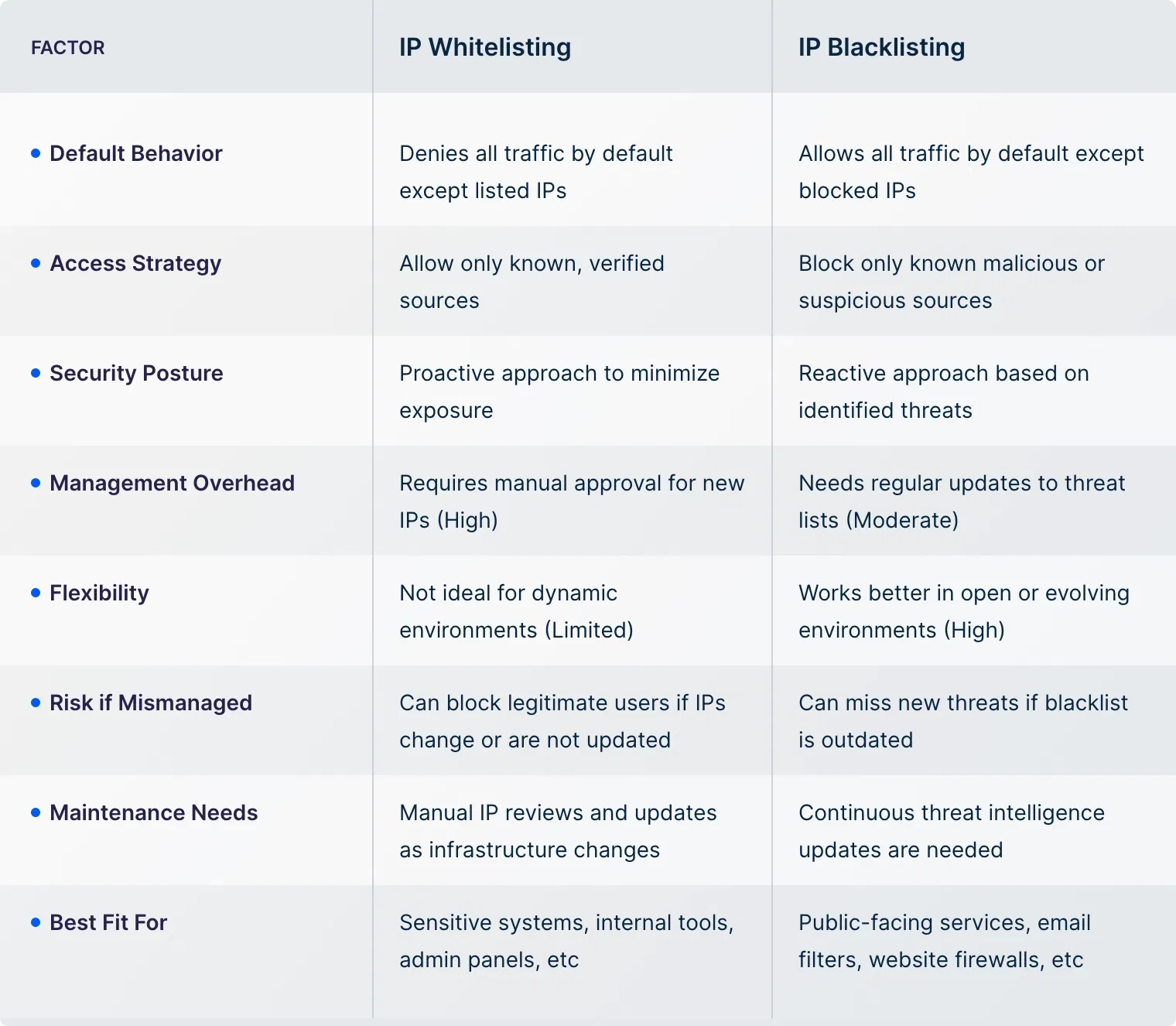
As we explore IP whitelisting, it’s important to clarify how it differs from IP blacklisting. Many confuse the two, but they serve opposite security purposes.
Blacklisting blocks only known threats while allowing everything else. Understanding this difference is key when deciding how to manage access and reduce risk. Here’s a detailed comparison to make things clear:
UTunnel offers a straightforward way to implement IP whitelisting by giving you access to clean, static IPs through its Access Gateway.
Whether you're securing admin dashboards, APIs, or backend systems, UTunnel simplifies whitelisting without cutting corners on security or control. Here’s what we offer:
Keep your whitelist updated regularly, use clean static IPs, combine it with other security measures like VPN or 2FA, monitor access logs, and only allow IPs that genuinely need access.
Zero Trust Network Access (ZTNA), identity-based access control, VPN with role-based permissions, and firewall rules based on behavior or device posture are all stronger and more flexible options.
Technically, Yes. However, it’s not ideal. Dynamic IPs change frequently, which can break access. You’d need to keep updating the whitelist or use dynamic DNS as a workaround.
Allowlisting is generally more secure because it blocks everything by default and only lets trusted IPs in. Blocklisting reacts to threats after they appear, which can leave gaps.
No. If other authentication layers fail or the IP is incorrectly configured, access may still be blocked despite being whitelisted.
Review it regularly, at least monthly, and update it whenever a team, partner, or infrastructure change occurs.
The attacker may gain access unless additional checks like authentication or device validation are in place. That’s why IP whitelisting should never be your only line of defense.

SCIM is a standard that helps you automate user account creation, up…
July 04, 2025

A cloud firewall is a security solution that helps filter and monito…
June 12, 2025
