Category : UTunnel Academy Published on 04 July 2025

Zero Trust Access (ZTA) is a security model that limits access to specific applications or resources based on identity and context. It doesn’t trust any user or device by default, even if they’re inside the network.

If you're running a remote team, managing contractors, or dealing with sensitive cloud workloads, ZTNA helps limit access to only what’s needed. You no longer have to expose your entire network just to let someone use a specific app or database.

This makes ZTNA especially useful for businesses that care about tighter access control, regulatory compliance, or reducing the risk of lateral movement after a breach.

How Does Zero Trust Access Work?

If you’re planning to move away from traditional approaches, understanding how Zero Trust Access works is a must. Here’s a quick breakdown of how it works to secure user access and protect resources:

  • Identity-based access controls: Every access request starts with user identity verification, not just IP or network location. ZTNA integrates with identity providers like SSO, LDAP, or SAML to confirm who the user is and what role they hold.
  • Device posture validation: After identity is confirmed, ZTNA evaluates the device's security posture. It checks for OS version, encryption, endpoint protection, and whether the device is managed. Only compliant devices can proceed.
  • Encrypted, brokered connections: ZTNA doesn’t expose the internal network directly. Instead, users connect to applications through a broker or connector that sits between them and the backend resource. This encrypted, intermediary connection ensures internal assets remain hidden and inaccessible to unauthorized parties.
  • Microsegmented resource access: Instead of broad network access, users are connected to individual apps or services based on assigned policies. This isolation prevents lateral movement inside the network, even if one device or account is compromised.
  • Real-time policy enforcement: Trust is re-evaluated continuously. Every session is monitored, and if a user changes network, location, or device, access is reassessed. This includes enforcement of context-aware rules like location restrictions or time-based access.

Key Principles Behind Zero Trust Access Solutions

Knowing how ZTNA works isn’t enough. To implement it effectively, you need to understand the principles that shape it. These foundational ideas determine how trust is built, evaluated, and revoked in real time.

Least Privilege Enforcement

Zero Trust follows the principle that no user should have more access than they absolutely need. Whether it’s internal staff, contractors, or external partners, access is limited to specific apps or services they require for their role. This reduces the risk of accidental exposure or misuse of sensitive data.

Identity and Device Trust Validation

Access decisions aren’t based on just a username and password. ZTNA verifies both who is making the request and what device they’re using. It checks if the device is managed, compliant, and running required security controls. Without passing this validation, no access is granted, regardless of credentials.

Microsegmentation

Instead of granting access to an entire network, ZTNA divides resources into small, isolated segments. Users are allowed to see and access only the specific apps or data they need, nothing more. Even if an attacker compromises a user account, they’ll hit a wall trying to move sideways within the network. This approach significantly limits the blast radius of any breach or internal misuse.

Continuous Monitoring and Trust Re-evaluation

ZTNA doesn’t operate on one-time trust. Every access session is continuously monitored for changes in user behavior, device status, or network context. If anything unusual is detected, like switching networks or signs of compromise, access can be adjusted or blocked instantly.

Session-Based Access Control

Access isn’t static in Zero Trust environments. Every session is evaluated in real time using contextual signals like device health, user location, or time of access. If anything changes during a session, the system can immediately block or restrict access. This real-time validation ensures that trust is always earned, not assumed.

Application-Centric Access

Instead of exposing the entire network, ZTNA limits users to specific applications they are authorized to use. They don’t even know other apps or systems exist outside their access scope. This reduces the attack surface and minimizes both internal threats and external breach opportunities. It also aligns well with cloud-based architectures where apps often live in different locations.

Pros and Cons of Zero Trust Access

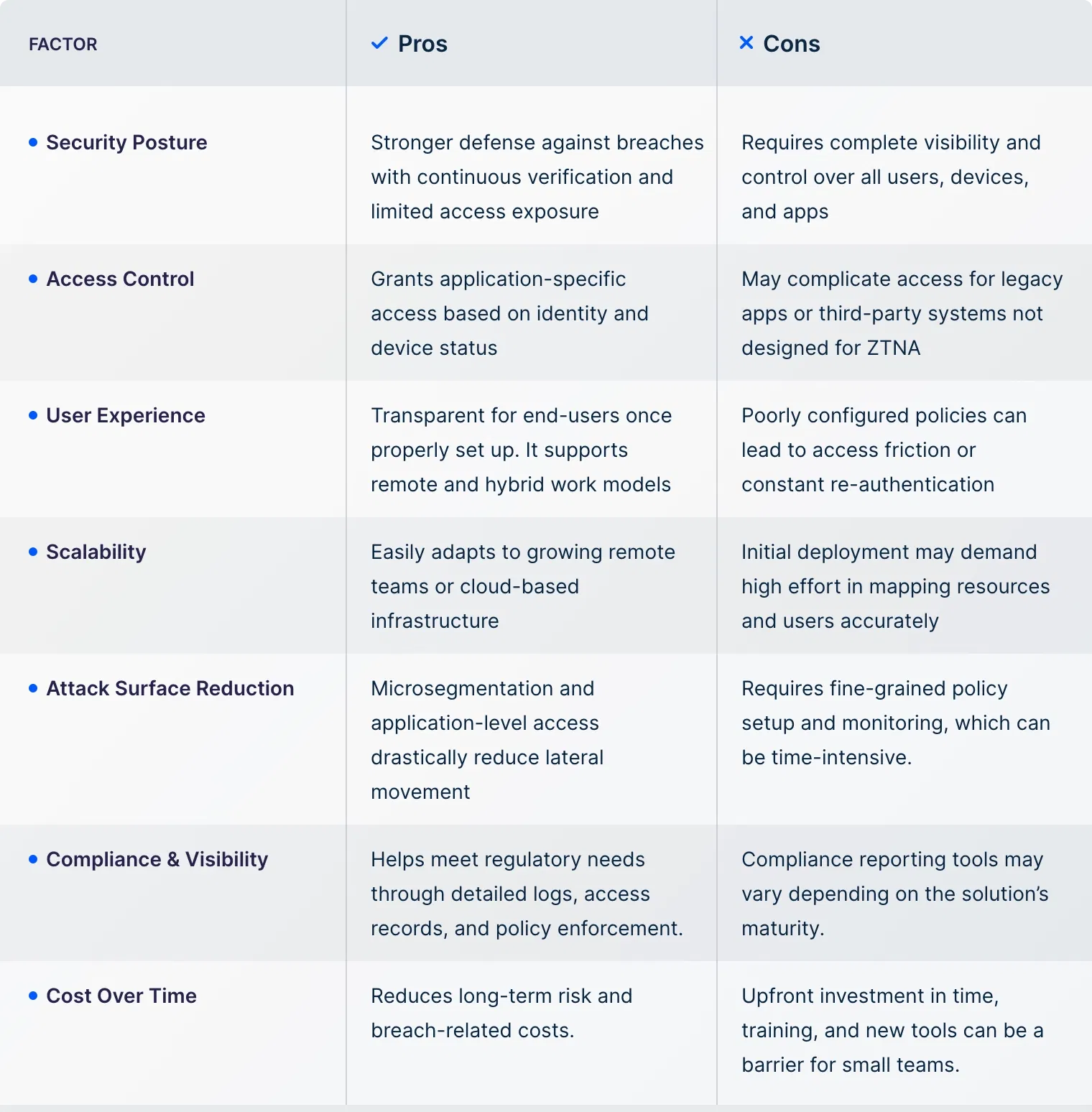
The final step before deciding whether to implement Zero Trust Access is to understand what it offers and the challenges it presents. ZTNA is clearly packed with exceptional features, but if it doesn’t meet your security needs, it could be a miss.

Here’s a breakdown of the core factors to help you weigh both sides clearly.
Use Cases for Zero Trust Access Solutions

If you’re still not sure whether ZTNA fits your needs, the best thing you can do is look at how it’s actually used. These use cases will help you see if Zero Trust Access makes sense for your team, infrastructure, or business goals.

  • Remote Workforce Security: If your team works from home, travels often, or logs in from public networks, ZTNA gives them secure access to internal tools without putting the rest of your systems at risk. Only authorized users on verified devices get in.
  • Third-Party and Contractor Access: You can give partners or vendors access to only the tools or services they need. With Zero Trust, they won’t see anything outside their assigned scope, keeping your core environment isolated.
  • Multi-Cloud and Hybrid Infrastructure: If you’re running resources across AWS, Azure, on-premise servers, or a mix of all three, ZTNA creates a unified security layer. You no longer have to rely on perimeter-based access. Instead, users get direct access to apps or services regardless of where they’re hosted, based on their identity and device trust.
  • M&A and Temporary Project Teams: When onboarding new teams or integrating after a merger, you can use ZTNA to quickly assign access without exposing your entire environment. As roles change or projects end, you can remove or update access just as easily.
  • IoT and Device-Level Segmentation: You can protect sensitive devices like POS systems, printers, cameras, or sensors by restricting who can talk to them. This ensures they can’t be used to jump into the rest of your network.
  • Role-Based Access for Internal Apps: Instead of giving blanket access to your internal tools, ZTNA lets you control who sees what based on roles. Whether it’s finance, dev, HR, or ops, you can make sure each team only reaches what they actually need.

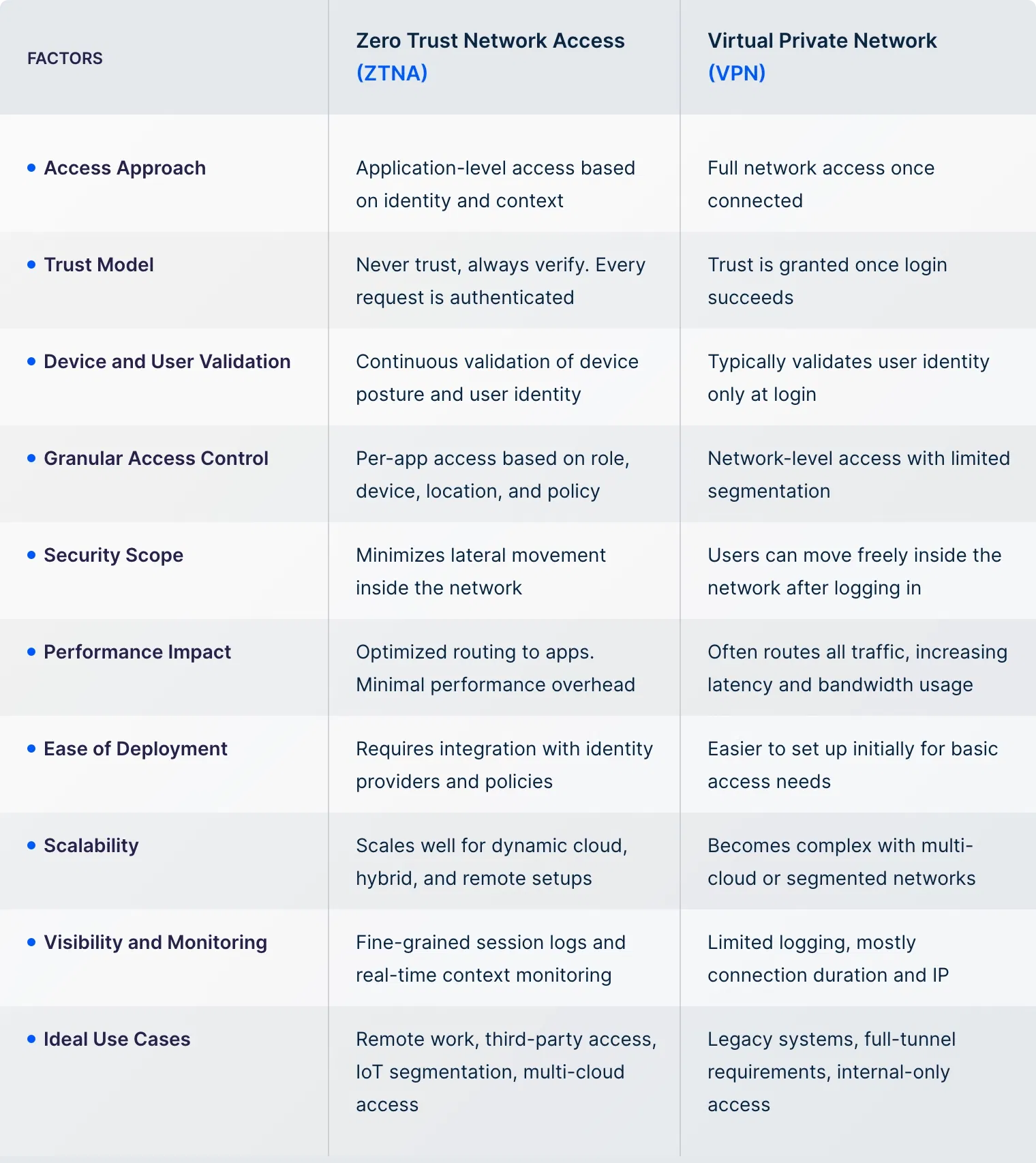
Zero Trust Network Access vs VPN

Many people confuse ZTNA with a VPN when choosing it. While both provide secure remote access, they work in completely different ways. Here’s a quick comparison to help you choose the right fit.
UTunnel MeshConnect: The Ultimate ZTNA Framework

At UTunnel, our ZTNA approach focuses on secure, controlled access across modern network setups. MeshConnect forms the foundation, enabling encrypted, policy-driven connections without exposing your internal systems.

Key Capabilities of UTunnel’s ZTNA

  • Application-Level Access with OneClick: Our Zero Trust Application Access (ZTAA), known as OneClick Access, lets users securely access internal applications like HTTP/S, RDP, or SSH through a browser. There's no VPN to connect to or client to install. Everything’s segmented, policy-driven access that fits your workflow.
  • Granular Access Control Policies: Define who gets access to what with precision. Set conditions based on identity providers (SAML, LDAP, SSO), device health, location, and more. Only verified users on secure devices can access the system.
  • Zero Trust Without the Complexity: We’ve eliminated the barriers to ZTNA deployment. Setup takes just a few clicks, whether you’re deploying in the cloud or on-premises. Our platform integrates with your existing identity stack and scales with your business.
  • Secure Access to Cloud and On-Premise Resources: From securing legacy applications to protecting modern cloud-native workloads, we support both environments. You can enforce least-privileged access and still maintain high performance and control.
  • Compliance-Ready Architecture: Built with security-first principles, our infrastructure is fully compliant with SOC 2 Type II, ISO 27001, and GDPR. We help you stay audit-ready while protecting sensitive data at every step.

Zero Trust Access FAQs

How to Deploy Zero Trust Access Solutions?

  • Policy configuration: Start by defining access policies based on user roles, devices, and resource sensitivity. This ensures each user only gets access to what they need.
  • Integration with IAM/MFA: Connect your Zero Trust setup with identity providers (like SSO, SAML) and enforce multi-factor authentication to validate users and their devices.
  • Continuous auditing and adaptation: Monitor sessions and user behavior in real-time. Update policies based on activity, compliance needs, or changes in your infrastructure.

How does Zero Trust Network Access differ from traditional VPNs?

Traditional VPNs allow full network access once connected, assuming trust. ZTNA verifies each request and limits users to only the resources they’re authorized to use.

Is ZTNA suitable for small and mid-sized businesses?

Yes. Many ZTNA solutions are scalable and cloud-based, making them accessible and cost-effective for SMBs without large IT teams.

What technologies are typically used in Zero Trust remote access?

ZTNA solutions control access using a combination of identity and access management (IAM), endpoint verification, encrypted tunnels, and continuous policy enforcement.

Can ZTNA replace VPNs for remote work?

In many cases, yes. ZTNA provides more secure, targeted access with less overhead, especially for distributed or cloud-first environments.

Does implementing Zero Trust require a complete network overhaul?

Not necessarily. You can deploy ZTNA alongside existing infrastructure and expand its scope over time based on priority systems and user groups.