


What is a Cloud Firewall (FWaaS)?
A cloud firewall is a security solution that helps filter and monito…
 June 12, 2025
OpenVPN protocol is a widely adopted open-source VPN solution known for its strong encryption and flexibility. It’s trusted by businesses of all sizes to create secure, remote connections over the internet or private networks.
Unlike legacy VPN protocols, OpenVPN offers greater adaptability. It works across firewalls, supports multiple ports and protocols, and is compatible with various operating systems and cloud environments. Whether you're connecting employees remotely or linking branch offices securely, OpenVPN gives you control over how and where your data flows.
To understand how OpenVPN works and why it remains a preferred choice in modern network security, let’s break it down.
OpenVPN creates a secure, encrypted tunnel between a VPN client and a server, allowing safe data transmission over the Internet. It relies on the OpenSSL library and supports strong encryption protocols and authentication methods.
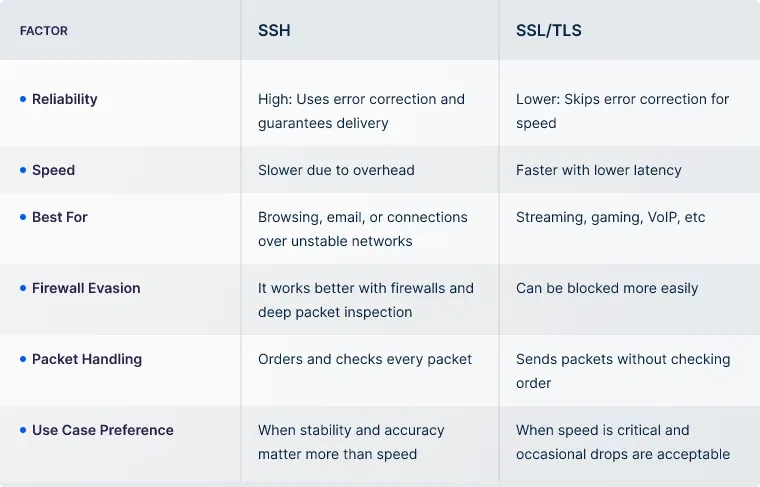
One of the most common points of confusion with OpenVPN is choosing between TCP and UDP. Both protocols serve different purposes, and the choice can directly affect connection speed, stability, and overall VPN performance.
If you're unsure which one to use, here’s a quick comparison that makes it easier for you:
Now that you're aware of how OpenVPN works and the differences between TCP and UDP modes, it's important to understand its key features. This way, you can realize why it's widely adopted for secure, flexible VPN deployments.
Apart from these, OpenVPN also offers flexible port selection, support for split tunneling, and compatibility with dynamic IPs, making it suitable for a wide range of network setups.
Now that you’ve seen how OpenVPN works and why it’s trusted for secure connections, let’s look at where it actually fits in the real-world situations where you’d use it. Knowing the real-world use cases helps you decide if it meets your specific business or personal needs.
For individuals, OpenVPN is a strong choice for browsing privately, bypassing regional restrictions, accessing streaming content, securing public Wi-Fi, and staying protected on untrusted networks.
Whether you're working remotely, traveling, or using a shared connection, OpenVPN gives you better control over how and where your data flows, either through your own setup or a trusted VPN provider.
While OpenVPN is a popular and trusted choice for businesses and individuals, it’s important to compare it with other VPN protocols. This helps you understand what each one offers and where it fits best.
WireGuard is a newer protocol known for its high-speed performance and lean codebase. It’s easier to audit and faster to deploy, which makes it appealing for businesses that want quick, lightweight VPN connections.
But if you’re looking for broader platform support or need something that works well across enterprise-grade firewalls, OpenVPN stands stronger. You’ll find OpenVPN more reliable when compatibility and deep configuration control matter.
PPTP is one of the earliest VPN protocols and is extremely easy to set up. However, its outdated encryption makes it unsuitable for environments where data protection is a priority. If you’re still using legacy systems and only need a basic VPN tunnel, it might serve a limited purpose.
However, for securing business-critical traffic, OpenVPN offers far better encryption, flexibility, and resilience, making it the safer and more modern choice.
L2TP/IPsec adds a layer of encryption over a tunneling protocol, but this double encapsulation can impact performance. It’s also more likely to be blocked by firewalls and might require more setup effort.
If you want something native to most operating systems without third-party apps, L2TP/IPsec is a valid choice. But if you’re working behind restrictive networks or want something that’s easier to fine-tune and maintain, OpenVPN gives you the edge with strong encryption and better firewall compatibility.
IKEv2/IPsec is especially effective on mobile devices, maintaining a stable connection even when switching networks. If your team works remotely and relies heavily on mobile access, IKEv2 can deliver a smoother experience.
Still, if you’re dealing with complex access rules or firewalls or need to run on custom ports like 443 to bypass restrictions, OpenVPN gives you more control and adaptability. It’s a better fit when connection flexibility and fine-grained settings are important to your network strategy.
UTunnel supports the OpenVPN protocol as part of its core VPN infrastructure, making it a practical option for businesses that prioritize reliability, security, and flexibility. Here’s a quick look at our offerings.
Beyond deployment and access control, UTunnel’s OpenVPN setup supports static IPs for easy allowlisting. Plus, external DNS configurations for custom domain routing, and secure identity integration through SSO and 2FA.
UTunnel Access Gateway is a complete, business-ready solution for implementing OpenVPN without added setup or operational complexity.
OpenVPN is a protocol used within a VPN to securely tunnel your internet traffic. A VPN is a full-service that gives you private, encrypted access to the internet or a network. OpenVPN is just one of the protocols a VPN can use to do that job.
Yes, OpenVPN is open-source and free to use. Many businesses and individuals rely on it for secure connectivity without licensing costs. You only pay for additional infrastructure or third-party services used with it.
Not at all. While newer protocols exist, OpenVPN is still actively maintained and widely used for its security, flexibility, and compatibility. An active developer community continues to provide security updates and performance improvements.
It supports both. Depending on your network requirements, you can run OpenVPN over TCP (for reliability) or UDP (for speed). This dual support makes it adaptable for various environments, such as streaming, remote work, or restrictive networks.
It’s the device or endpoint that manages and routes encrypted VPN traffic for connected clients. Businesses often deploy OpenVPN servers on the cloud or on-premises to control user access and secure internal systems.

A cloud firewall is a security solution that helps filter and monito…
June 12, 2025

SAML authentication lets users log in once and access multiple busin…
July 04, 2025

Zero Trust Access (ZTA) is a security model that limits access to sp…
July 04, 2025
