

What Is VPN Obfuscation? The Hidden Laye…
Are standard firewalls and other conventional methods not working ou…
 July 14, 2025
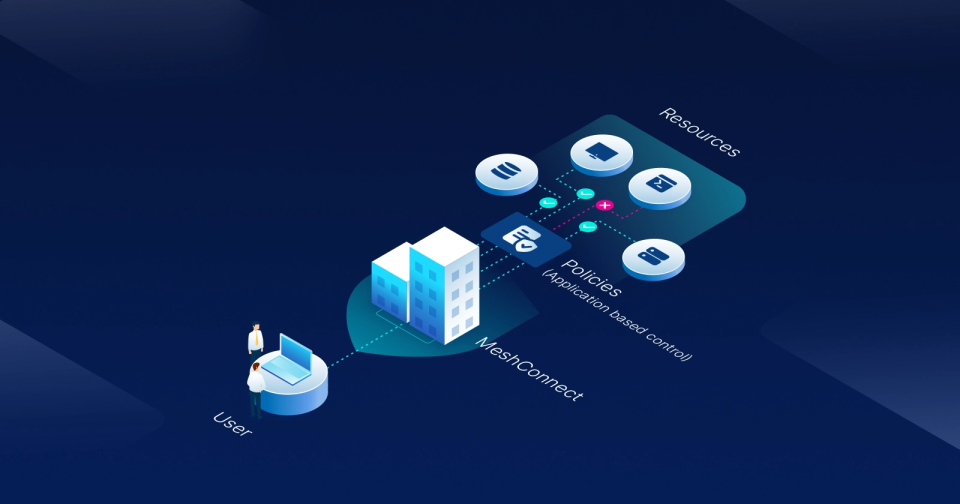
Having difficulty managing how remote teams, vendors, or contractors connect to your internal resources? If your setup still depends on a VPN, it’s likely exposing more of your infrastructure than it needs to.
What’s missing is the ability to give access based on what a user actually needs and not to the whole network. It must be specific applications or services they work with. That’s where application-level access comes in. But how does that work in practice? Let’s find out.
VPNs have been the go-to solution for remote access for decades, thanks to their ability to create secure, encrypted tunnels between users and internal networks. They made connecting distributed teams possible at a time when few alternatives existed.
However, as businesses and infrastructures evolved, VPNs started showing serious limitations:
Application-level access means granting users entry only to the specific apps, databases, or services they need, rather than the entire network. Instead of putting someone “inside the walls” of the network, it delivers controlled, role-based access directly to the resource that matters.
This change solves many of the problems tied to traditional VPNs. By aligning access with actual user needs, businesses reduce unnecessary exposure, improve security, and gain more control over how resources are used.
So, why are more companies making this shift?
One of the biggest concerns with traditional VPNs is how much access they hand out. Once connected, a user often lands inside the broader network, even if they only need one or two tools. This creates opportunities for lateral movement, meaning that if a single account is compromised, the intruder can move deeper into the network.
Application-level access changes this model by limiting entry to only the specific apps or services required. The rest of the network stays invisible, so even if something goes wrong, the potential damage is contained.
VPNs often feel heavy for end users. They require connecting to a tunnel first, then navigating to the tool or service they actually need. When multiple apps are involved, switching between them can mean repeated logins or unstable connections.
With application-level access, users skip the tunnel altogether. They sign in once and reach only the apps tied to their role. The process is faster, more reliable, and less disruptive to daily work. For employees and contractors alike, this makes remote access less of a hurdle and more of a natural part of getting things done.
Traditional VPNs were ideal when most employees worked in offices and accessed a handful of centralized systems. However, teams are now distributed across locations, contractors come and go, and applications live in a mix of on-prem, cloud, and hybrid environments.
Expanding a VPN to cover all this often means adding new servers, managing more tunnels, and dealing with performance bottlenecks. Application-level access scales differently. Since access is tied directly to apps and users, it adapts more easily to growing teams and shifting infrastructures.
New users can be onboarded quickly, and access can be adjusted as roles or projects change without needing to reconfigure the entire network.
With VPNs, it’s difficult to answer a simple but critical question: Who accessed what and when? VPNs were designed to connect users to a network, not to provide detailed logs of activity at the application level. For industries under strict regulations, this lack of clarity makes audits and reporting much harder.
Application-level access closes that gap. Every login and action can be tied to a specific user and a specific application. This makes it far easier to prove compliance with standards, monitor unusual behavior, and generate reports for audits.
Maintaining a VPN often means juggling user credentials, rotating keys, and segmenting access manually. As organizations grow, this becomes a constant overhead for IT teams. Each new hire, contractor, or system update can introduce another round of configurations and troubleshooting.
Application-level access removes much of that complexity. Access is defined by role or identity, not by network tunnels. IT admins can quickly assign or revoke permissions at the application level without touching the entire network. This not only saves time but also reduces the chances of mistakes that could leave systems exposed.
Now that you know how application-level access improves on traditional VPNs, it’s worth noting that it may not be the right solution in every scenario. The key is understanding where it delivers the most value.
Here are some common use cases that can help you decide:
Apart from these, some companies may also see value in areas like mergers and acquisitions, global expansions, or highly distributed partner ecosystems. While these situations are less common, they highlight just how flexible application-level access can be compared to traditional VPNs.
How UTunnel Supports Application-Level Access?
We built MeshConnect, backed by ZTNA, to solve the problems companies face with VPNs. Instead of giving broad network access, we create a secure mesh that connects offices, cloud environments, and remote sites.
We also provide OneClick Access, based on ZTAA, for direct application-level control. With it, we set up encrypted tunnels straight to apps like SSH, RDP, or web services. Users log in once and land only where they’re supposed to, while we keep visibility and auditing in place for IT teams.
Together, MeshConnect and OneClick replace the old VPN model with precise, role-based access that fits today’s way of working.
Not exactly. Zero Trust is the broader security principle of “never trust, always verify.” Application-level access is one way to apply that principle by limiting users to specific apps.
In many cases, yes. It's a better fit for connecting users to specific apps and services than VPNs. But for full network tunneling needs, some organizations may still keep VPNs alongside.
Yes. Application-level access can be applied to resources hosted in the cloud, on-premise, or in hybrid setups.
No. Since users connect directly to the apps they need, traffic doesn’t have to pass through a central tunnel. That usually means faster, more reliable performance.
Are standard firewalls and other conventional methods not working ou…
July 14, 2025
Are you still relying on standard setups to keep your IoT applicatio…
October 07, 2025
