Every time a device connects to a website, it first asks a Domain Name System (DNS) server to translate the site’s name into an IP address. DNS filtering works by checking requests and blocking unsafe or unwanted domains before a connection is made.
Instead of letting harmful websites load or wasting resources on distractions, DNS filtering solutions take action. They filter out domains that carry risks like malware, phishing, or inappropriate content. This way, the threats are stopped at the DNS level, which means they never reach the browser or the device.
Implementing DNS filtering is often recommended. It improves security, manages internet use, and reduces risk across any connected environment, whether it’s a local office or a remote setup.
How Does DNS Filtering Work?
Every time a user types a domain name, the DNS translates it into an IP address. A DNS filtering solution steps in during this process, checking the domain against threat databases or custom rules.
If the domain is flagged, due to malware, phishing, or policy violations, the request is blocked or redirected before reaching the site. Instead of reaching the intended website, the user is redirected to a warning page or simply denied access.
Because this filtering happens at the DNS level, it’s fast, network-wide, and doesn’t rely on software being installed on every device. Plus, the best part is that it also works across all protocols, not just web traffic.
Why is DNS Filtering Important for Businesses?
Trying to decide whether to implement DNS filtering at your organization? The following points will help you determine whether it's the right tool for your business needs.
Blocks harmful websites before they load: It prevents users from reaching domains associated with malware, phishing, or botnets. The threat is stopped at the DNS level, before anything gets downloaded.
Limits access to unauthorized apps and services: Helps prevent employees from using risky or unapproved tools. This reduces shadow IT and strengthens overall control.
Supports workplace internet policies: You can restrict access to entire categories like gambling, adult content, or streaming. It keeps usage aligned with your company’s acceptable use guidelines.
Protects remote teams effectively: DNS filtering applies regardless of where users connect from. It offers lightweight protection without needing full VPN coverage.
Helps meet security and compliance standards: By restricting access to high-risk content, it supports frameworks like ISO 27001, HIPAA, or SOC 2. A helpful layer for data-sensitive environments.
Reduces unnecessary bandwidth consumption: Content-heavy or time-wasting sites can be blocked to keep networks running smoothly. Business-critical traffic gets prioritized as a result.
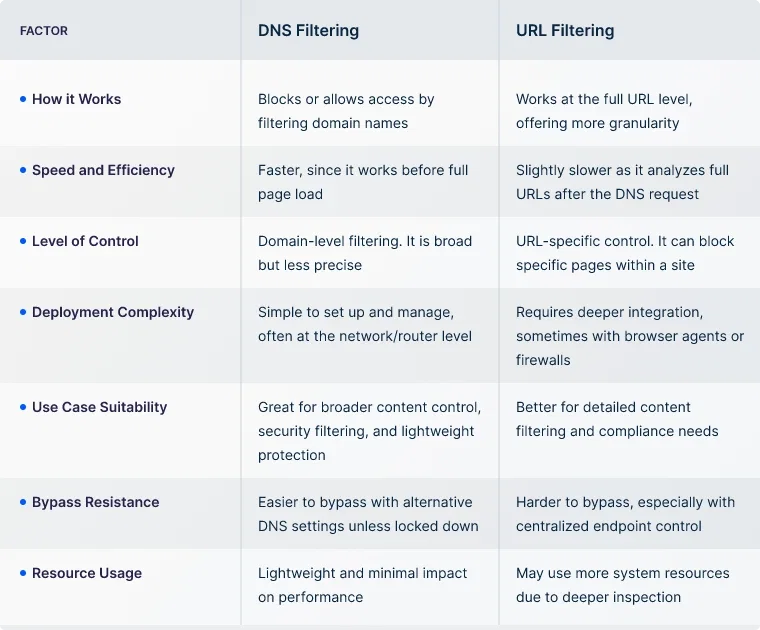
DNS Filtering vs URL Filtering
While DNS filtering might be a preferred solution, you also have URL filtering. Many get confused between both, trying to figure out which is the best filtering solution. Here's a quick comparison to help clear that up:
Choosing a DNS Filtering Service
If you have proceeded with DNS filtering for your business needs, it's crucial to choose the right solution that aligns with your network goals and user security requirements. The following points serve as a checklist to help guide your decision:
Assess deployment simplicity and integration compatibility: The solution should fit into your existing infrastructure without disrupting operations.
Look for real-time threat intelligence: A good service must update its blocklists regularly to protect against the latest phishing, malware, and botnet domains.
Consider custom filtering policies: You should be able to block or allow access to specific categories or domains based on your organization's usage policies.
Review logging and reporting features: Clear, actionable insights into DNS queries and blocked threats can help improve security posture and track user behavior.
Support for remote and BYOD environments: If your team works across multiple networks or devices, your DNS filter must extend protection beyond just the office perimeter.
Check for compliance support: Some services help businesses meet regulatory standards by restricting access to high-risk or non-compliant domains.
Scalability and flexibility: Whether you're a small team or a growing enterprise, your DNS filtering solution should adapt to evolving network demands.
Reliability and support: Make sure the provider offers strong uptime, ongoing support, and clear service-level commitments.
UTunnel’s Approach to DNS Filtering
UTunnel provides built-in DNS filtering features that help strengthen network control and reduce exposure to unwanted or unsafe content. Whether you're aiming to enforce internal security policies or integrate your own DNS infrastructure, UTunnel provides the tools to support it.
Web Filtering
UTunnel’s Web Filtering is a DNS-based control layer that lets you restrict access to specific types of web content at the DNS resolution stage itself. This means users are blocked from reaching harmful or unwanted domains before any connection is made.
You can enable DNS-based filtering rules from your dashboard, defining which domains (e.g., adult content, social media, gambling, malware) should be blocked.
UTunnel maintains updated domain category lists and blocklists, ensuring that newly identified threats and harmful content are filtered out in real time.
Since this operates at the DNS layer, it works across all devices connected to the VPN, without needing separate endpoint software.
DNS Zones
For internal DNS needs, UTunnel’s Access Gateway lets you create and manage DNS Zones. These are custom domains that are only accessible to VPN-connected clients.
You can define internal domains and configure corresponding DNS records like A, CNAME, or MX.
These internal zones allow businesses to resolve services such as internal applications, servers, or file storage by friendly names rather than IP addresses.
DNS Zones are scoped to your VPN, meaning they are invisible to the public internet and accessible only while connected to your UTunnel Access Gateway.
Additional DNS Capabilities Available with UTunnel
Beyond Web Filtering and DNS Zones, UTunnel offers other DNS-related options that further support customization and advanced configurations:
DNS Forwarding: The Access Gateway DNS can act as a forwarder, allowing DNS requests for specific domains to be routed to designated DNS servers. You can configure domain-specific forwarding rules directly from the dashboard.
Custom DNS: Instead of using the default UTunnel DNS, you can specify your own DNS servers for all VPN-connected devices. It’s handy if you have an internal DNS setup or wish to enforce third-party DNS-based policies.
Split DNS: When both Custom DNS and Split Routing are enabled, you can define internal domains that will specifically resolve through your internal DNS, without affecting external lookups.
Host Records: A quick way to create individual hostname-to-IP mappings without needing a full DNS zone. Ideal for simple internal routing needs or ad hoc device assignments.
FAQs on DNS Filtering
What does DNS filtering do?
DNS filtering blocks access to specific domains by checking website addresses against predefined rules or blocklists before loading the site. It helps prevent visits to harmful or unwanted websites.
How do I enable DNS filtering?
You can enable it through a DNS filtering service, your router settings, or a network security platform. Some VPN and access gateway solutions also allow built-in DNS filtering configuration.
Does Google offer a DNS filter?
No, Google Public DNS is a resolver service. It doesn't actively filter or block domains unless the domain is unsafe or unreachable by design.
Is a DNS filter better than a firewall?
They serve different purposes. A DNS filter blocks access to domains, while a firewall manages network traffic based on IP addresses and ports. Together, they offer layered protection.
Which is better VPN or DNS?
A VPN encrypts all your traffic and hides your IP, while DNS filtering controls access to specific websites. They’re not alternatives, many businesses use both to strengthen security.