

What is a Cloud Firewall (FWaaS)?
A cloud firewall is a security solution that helps filter and monito…
 June 12, 2025
If your business network needs protection from unknown devices or unauthorized users, Network Access Control (NAC) is what helps enforce that. It lets you decide who can access your network, when, and under what conditions.
NAC works through defined rules. These rules can check user identity, device type, location, or security posture. Only those that meet your set policies are allowed in.
Whether it's staff, vendors, or smart devices, NAC gives you the control to grant or block access based on trust. It's a critical step toward securing internal networks in any modern organization.
Network Access Control (NAC) operates by enforcing security policies at the point of network entry. It uses a combination of authentication, authorization, and posture assessment before allowing access.
When a device attempts to connect:
NAC solutions may be agent-based, agentless, or hybrid, depending on deployment needs. They work across wired, wireless, and VPN connections, ensuring all access points are controlled under a unified policy.
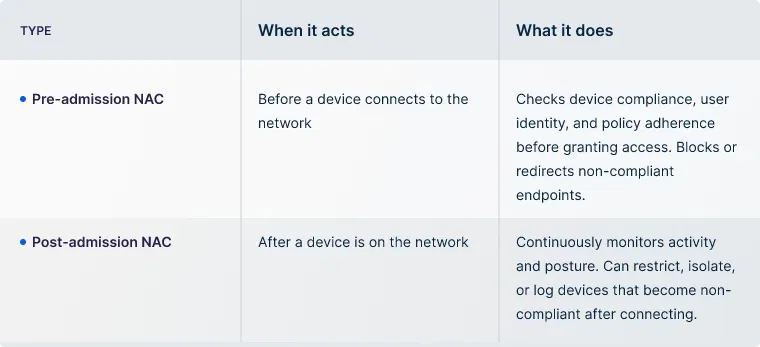
With an understanding of how NAC works, it's equally important to know the two core approaches it follows. These types define when and how the system validates and monitors devices trying to connect to the network.
Modern NAC solutions are built to do more than just block or allow access. They offer a range of capabilities that support secure, policy-driven access control across dynamic IT environments.
Now that you’ve grasped how NAC works, the next step is understanding where it fits. If you're exploring network access control solutions, these common use cases will help clarify when and why they matter.
With bring-your-own-device policies, controlling what connects to your network becomes critical. NAC checks every personal device for basic security standards like updated software or antivirus before granting access. Only compliant devices can connect, reducing exposure to risky endpoints.
From security cameras to smart HVAC systems, IoT devices are often overlooked in network security. NAC identifies these devices, groups them by function, and restricts their access. It ensures they can only interact with systems they truly need.
Short-term users like guests, auditors, or vendors shouldn’t have open access. NAC allows IT teams to place them in isolated segments, apply time limits, and restrict their access to approved resources. It protects your internal systems while keeping access smooth.
If you operate in regulated sectors, access control is often a compliance requirement. NAC helps enforce who can access what, records activity, and provides detailed logs for audits. This makes it easier to stay aligned with standards like HIPAA, PCI-DSS, or ISO 27001.
Many connected systems in hospitals and factories are always on and highly sensitive. NAC helps identify and isolate these devices. If anything behaves abnormally or is tampered with, NAC prevents the issue from spreading across the network.
Note: While these are some of the most common scenarios, network access control solutions are often flexible. They can adapt to fit a wide range of environments, depending on the organization’s structure, industry, and access challenges.
Once you've identified your access control needs, it’s important to implement network access control solutions the right way. A strong deployment offers better security, easier management, and long-term scalability. Here are some best practices to guide your implementation:
UTunnel offers built-in Network Access Control (NAC) capabilities through its Access Gateway and MeshConnect solutions. It helps businesses regulate access at the user, device, and resource level.
It enables VPN-based NAC by enforcing access control policies tied to users and devices. Admins can restrict access to only pre-approved devices and block connections based on the device’s operating system. This makes sure that only trusted endpoints are allowed into the network, reducing exposure to unknown devices, even if login credentials are compromised.
This unique solution extends these NAC principles to more complex environments by offering Zero Trust Network Access (ZTNA). With this, businesses can grant resource-specific access instead of full network access, helping prevent lateral movement. Access is governed by policies based on user identity, device type, and contextual factors like time or location.
Both solutions include centralized policy enforcement, meaning administrators can configure, audit, and update access rules from a single dashboard. This simplifies management and ensures consistency across cloud, on-premise, or hybrid environments.
UTunnel also supports real-time compliance checks by evaluating device and user status before granting access. Combined with integrated logging and monitoring, this helps businesses stay aligned with internal security policies and external compliance requirements.
Want to know more about how Network Access Control can support your organization’s security goals? Contact us or explore UTunnel’s solutions to see how easy it is to implement device-level controls and policy-based access across your network.
NAC works on the principle of controlling who or what can access a network. Before granting access, it verifies the identity, device type, and compliance status.
It can be either or both. Depending on deployment needs, some NAC solutions are fully software-based, while others may include dedicated appliances.
A firewall controls traffic flow between networks, while NAC controls who or what gets to connect to the network in the first place.
Any organization that wants to secure its network against unauthorized devices or users, especially those with remote teams, BYOD policies, or compliance requirements.
Small businesses can adopt cloud-based or software-only NAC solutions that are easy to deploy and manage without heavy infrastructure or IT overhead.
A cloud firewall is a security solution that helps filter and monito…
June 12, 2025

IP whitelisting is a method of controlling network access by allowin…
July 04, 2025

SCIM is a standard that helps you automate user account creation, up…
July 04, 2025
