

What is a Cloud Firewall (FWaaS)?
A cloud firewall is a security solution that helps filter and monito…
 June 12, 2025
Network as a Service (NaaS) is a cloud-based model that provides fully managed networking services. It is often used to implement services like routing, firewalling, bandwidth management, and secure access on demand.
You don’t have to buy, configure, or maintain routers, firewalls, or VPN appliances. Instead, you subscribe to these capabilities as needed. For businesses, NaaS means predictable costs, easier scaling, and faster deployment across teams, offices, or cloud environments.
With remote work, cloud migration, and cybersecurity needs growing fast, NaaS gives your business the flexibility to adapt without rebuilding your network from scratch. It fits into modern IT strategies that demand agility, visibility, and control.
A typical Network as a Service (NaaS) setup replaces traditional on-site networking gear with a fully cloud-managed environment. The provider handles all back-end operations such as provisioning, routing, access policies, load balancing, and security patching. This reduces the hassle that comes with manual configuration.
To put it simply, businesses can connect to a provider-managed infrastructure through encrypted tunnels or virtual gateways. The admins interact with a web-based dashboard to monitor traffic, apply rules, or scale services based on the business needs.
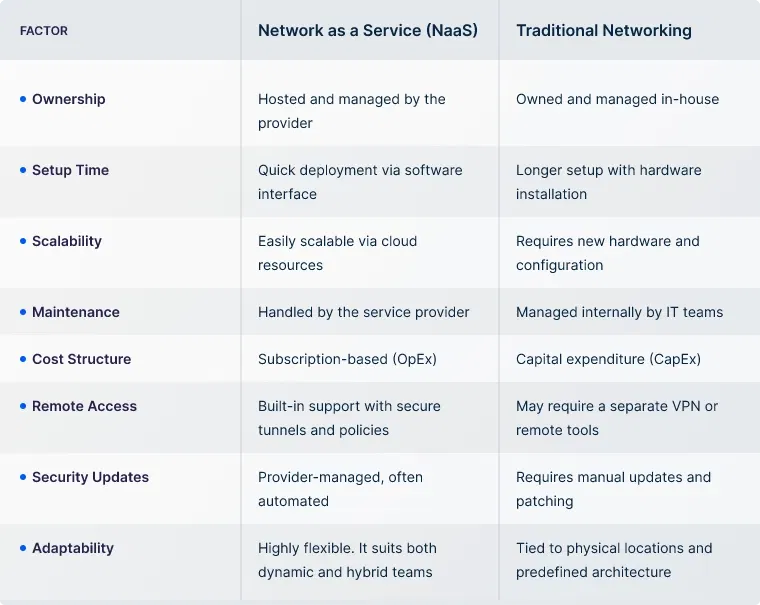
While NaaS has been widely implemented by many businesses, some remain confused about whether it’s a complete replacement. Hence, here is a quick comparison between both.
Now that you know what Network as a Service (NaaS) is, it’s important to understand the types available before considering it for your business. Each model offers a different level of flexibility, control, and security, depending on what your organization is trying to achieve. Below are the most common types:
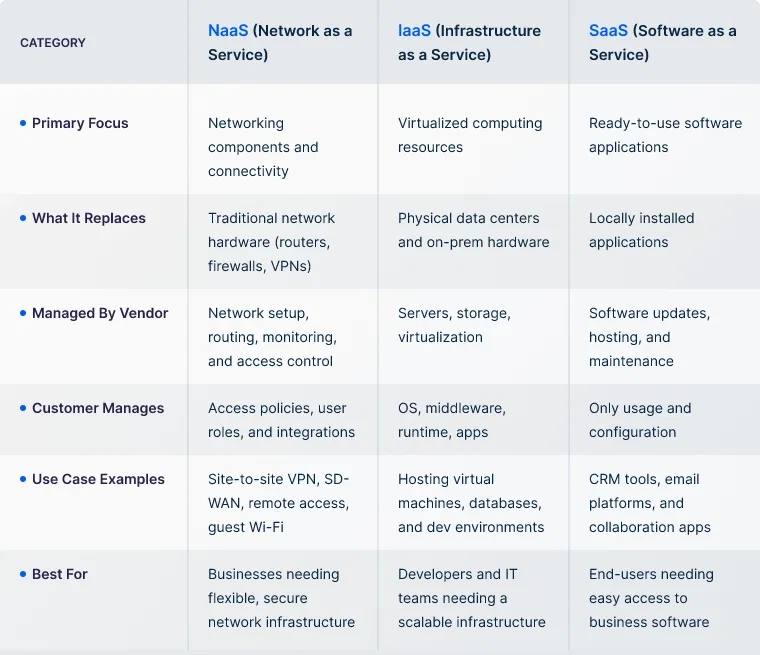
If you're exploring Network as a Service solutions, there's a high chance you've come across similar terms like IaaS or SaaS. It’s common to get curious or confused about how they differ. Here’s a simple comparison that breaks it down.
Understanding the benefits of NaaS helps realize why it is implemented in many industries. If you’re implementing NaaS for your business, expect the following benefits.
While NaaS is loaded with benefits, sometimes it might not be the right choice for your business. Before proceeding with implementing NaaS, check out the most common use cases and verify if your business has similar needs.
While Network as a Service (NaaS) can be easier to implement than traditional setups, you might still run into a few challenges. Keep an eye on the following to avoid friction and ensure a smoother experience.
UTunnel delivers Network as a Service solutions by offering software-driven connectivity through Access Gateway and MeshConnect.
With Access Gateway, teams can quickly deploy dedicated VPN servers in the cloud or on-premises, complete with support for OpenVPN, IPsec, static IPs, and site-to-site VPN tunnels. User access is governed with role-based controls, device-level filtering, and SSO/2FA integrations.
MeshConnect brings in advanced Zero Trust Network Access (ZTNA) and mesh networking. It enables resource-specific access, multi-site connectivity, IoT device access, and dynamic enforcement based on user identity and device context
Both solutions are controlled through a unified web-based dashboard. This allows IT teams to easily configure routing, DNS, firewall rules, access controls, and monitoring. Changes like scaling or policy updates can be applied on demand.
Yes. NaaS removes the need for complex infrastructure and lets small businesses manage secure, scalable networks through flexible subscriptions and easy-to-use platforms.
A VPN provides encrypted access to a private network. NaaS goes beyond that, it includes full network management, access control, routing, and monitoring delivered as a cloud-based service.
SASE is a broader security framework that combines networking and security in the cloud. NaaS focuses mainly on delivering network functions. SASE often includes NaaS components, but with added security layers like SWG, CASB, and ZTNA.
NaaS simplifies infrastructure by shifting network setup, maintenance, and scaling to a service provider. Internal teams can focus more on business goals than on managing switches or firewalls.
Yes. Most NaaS platforms support integration with identity providers, cloud services, and security tools to fit into existing workflows.
A cloud firewall is a security solution that helps filter and monito…
June 12, 2025

SCIM is a standard that helps you automate user account creation, up…
July 04, 2025
SAML authentication lets users log in once and access multiple busin…
July 04, 2025
