

What is SCIM (System for Cross-domain Id…
SCIM is a standard that helps you automate user account creation, up…
 July 04, 2025
Secure Shell (SSH) is a secure protocol for accessing and managing remote systems over a network. For businesses, it’s commonly used to connect to cloud servers, run remote commands, or transfer files securely.
What sets SSH apart is encryption. It protects every session, login, and command from being intercepted. That’s why it’s widely used for server administration, automation scripts, and secure file transfers in business environments.
If your team needs reliable access to critical infrastructure or wants to avoid exposing credentials, SSH is a go-to tool for secure remote operations.
Secure Shell (SSH) works by creating an encrypted connection between a client and a remote server. This secure tunnel ensures that any data, commands, or credentials shared during the session can’t be intercepted or tampered with.
When a user initiates an SSH session, the client verifies the server’s identity using a cryptographic key. Once verified, the user logs in with either a password or an SSH key. All communication after that is encrypted end-to-end.
SSH runs over TCP (typically on port 22) and supports secure command execution, file transfers (via SCP or SFTP), and port forwarding. These are useful for remote system administration and secure infrastructure access in a business environment.
Understanding SSH’s key features gives clarity on how it strengthens remote access and system security. These features are what make SSH a preferred choice in business IT environments:
If you're implementing SSH for your business, it's important to realize how and where it's often used. This will help you determine whether SSH is the right solution.
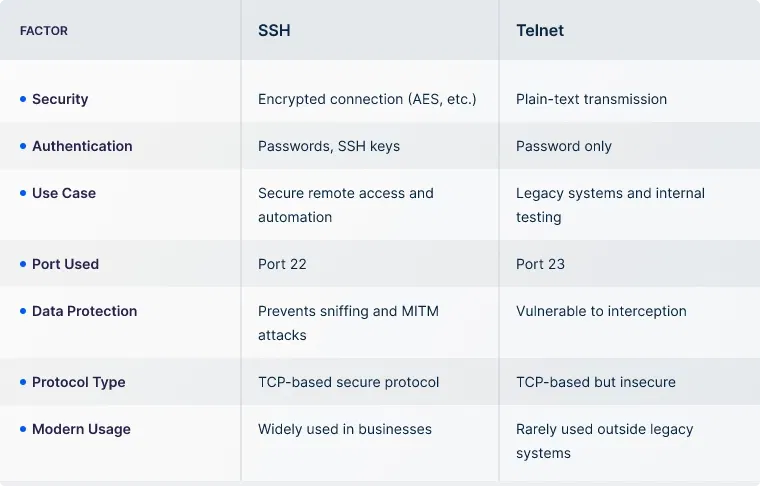
Before SSH, many businesses relied on Telnet, a protocol that transmits data in plain text. This created serious security gaps, especially in enterprise settings.
SSH closed those gaps by encrypting communication and offering stronger authentication methods. It quickly became the industry standard for secure system administration, file transfer, and automated remote tasks.
If you’re still comparing SSH and Telnet, here’s a quick breakdown of how they differ:
SSH tunneling is a method of securely forwarding network traffic from one system to another using the encrypted SSH protocol.
It allows businesses to create secure pathways (or “tunnels”) for data to travel over untrusted networks. This is especially useful for accessing internal applications, databases, or systems from remote locations without exposing them to the internet.
SSH tunnels can forward local, remote, or dynamic ports. Thus, you can route traffic securely from a local device to a remote server or even set up a temporary encrypted proxy.
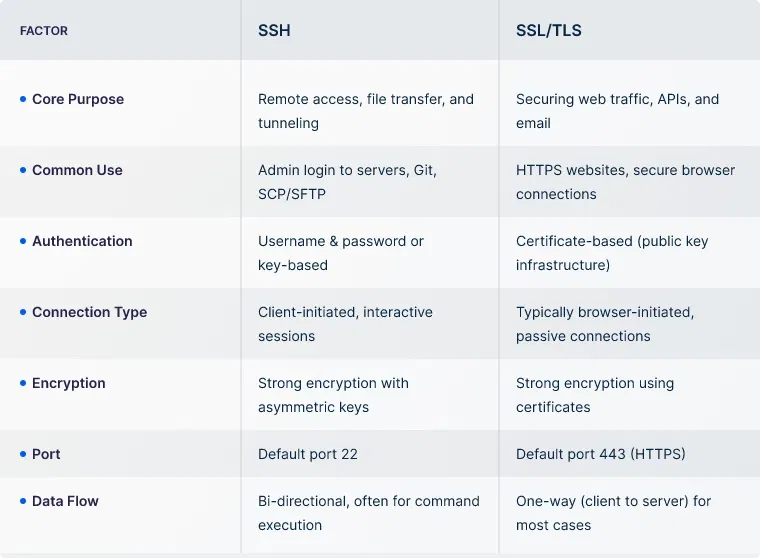
Now that you've seen how SSH tunneling works, it's common to question how it compares to SSL/TLS. Both are encryption protocols that protect data, but they’re not built for the same purpose.
If you’re setting up secure remote access or encrypted data transfers, understanding the difference helps you choose the right solution. Here’s a quick breakdown of when SSH makes more sense and where SSL/TLS fits better.
SSH keys have been mentioned several times, but what exactly are they? SSH keys are cryptographic credentials used to authenticate access between a client and a server. They come as a pair, a private key kept securely on the user’s device and a public key stored on the target system. When the two match during a connection attempt, access is granted without the need for passwords.
Managing these keys involves securely generating, storing, distributing, and revoking them. For businesses, this means controlling who has access, where keys are used, and ensuring they don’t linger beyond their intended purpose. Without proper management, organizations risk unauthorized access and policy violations. That’s why many implement automated key rotation, expiry policies, and central visibility tools.
For businesses looking to simplify and secure SSH access, UTunnel offers a browser-based solution through OneClick Application Access. It enables authorized users to initiate SSH sessions with a single click — no local client software or manual key setup required.
The OneClick Application streamlines SSH access for teams and contractors by eliminating traditional CLI configurations and shifting session management to the browser. This makes it easier to grant access without compromising on control or security.
Connections are governed by UTunnel’s Zero Trust Application Access (ZTAA) framework. Access is policy-driven and based on user identity, device, location, and time. This reduces lateral movement risk and ensures each session aligns with your organization’s security requirements.
It also supports rotating devices, enforces role-based permissions, and minimizes setup overhead. Everything’s handled while being compliance-ready, with clientless SSH access.
SSH uses the TCP protocol. It relies on a reliable, connection-oriented communication channel to maintain secure sessions.
By default, SSH runs on port 22. However, it can be configured to use a different port based on your setup or security preferences.
A VPN encrypts all network traffic between devices, creating a secure tunnel across the internet. SSH, on the other hand, is primarily used to securely access remote systems and transfer files at the command level.
It depends on the use case. SSH is ideal for server management and secure file access. VPNs are better for full network access or applications that need a broader range of connectivity.
SSH keys are cryptographic credentials that are nearly impossible to brute-force. Unlike passwords, they aren't transmitted over the network and can't be reused across services.
Yes, SSH supports secure file transfer via tools like SCP (Secure Copy) or SFTP (SSH File Transfer Protocol).
SCIM is a standard that helps you automate user account creation, up…
July 04, 2025
A cloud firewall is a security solution that helps filter and monito…
June 12, 2025
