

What is SCIM (System for Cross-domain Id…
SCIM is a standard that helps you automate user account creation, up…
 July 04, 2025
An IPSec VPN uses the IPSec protocol suite to create a secure, authenticated, and encrypted tunnel between two endpoints over IP networks. It protects data in transit by applying encryption and integrity checks at the IP layer, making it ideal for securing communication across public and private networks.
This type of VPN is commonly used for site-to-site connectivity between offices or for enabling remote access to internal resources. Unlike application-layer security tools, IPSec VPNs operate at the network layer, allowing them to secure all traffic regardless of the app or protocol used.
To understand how IPSec VPN achieves this, it’s important to first understand what IPSec actually is.
IPSec (Internet Protocol Security) is a framework of open standards that secures IP communications by authenticating and encrypting each IP packet in a session. Instead of being a single protocol, it’s a collection of protocols that define how to secure data at the IP layer.
IPSec is commonly used in VPNs to create secure tunnels over untrusted networks. It can operate in different modes and supports flexible encryption, key exchange, and authentication methods. They are all managed through a set of defined rules called Security Policies and Security Associations (SAs).
To put it simply, IPSec enables trusted communication by making sure data packets are encrypted, validated, and not tampered with.
Instead of securing just the application or browser, an IPSec VPN secures everything at the network layer. It creates a private, encrypted tunnel over the internet that protects all IP traffic between two endpoints.
Here’s what happens under the hood:
To better understand how IPSec actually secures traffic, it’s important to examine two things closely: the core protocols (AH and ESP) and the operating modes (Tunnel and Transport). Let’s break these down simply.
ESP is preferred in most deployments, especially for privacy-focused applications. AH is mainly used in environments that need strict data validation without encryption overhead.
Now that you know how IPSec secures traffic, it’s important to understand that the protocols provide the security. Meanwhile, the modes define how security is applied. Here’s a quick breakdown.
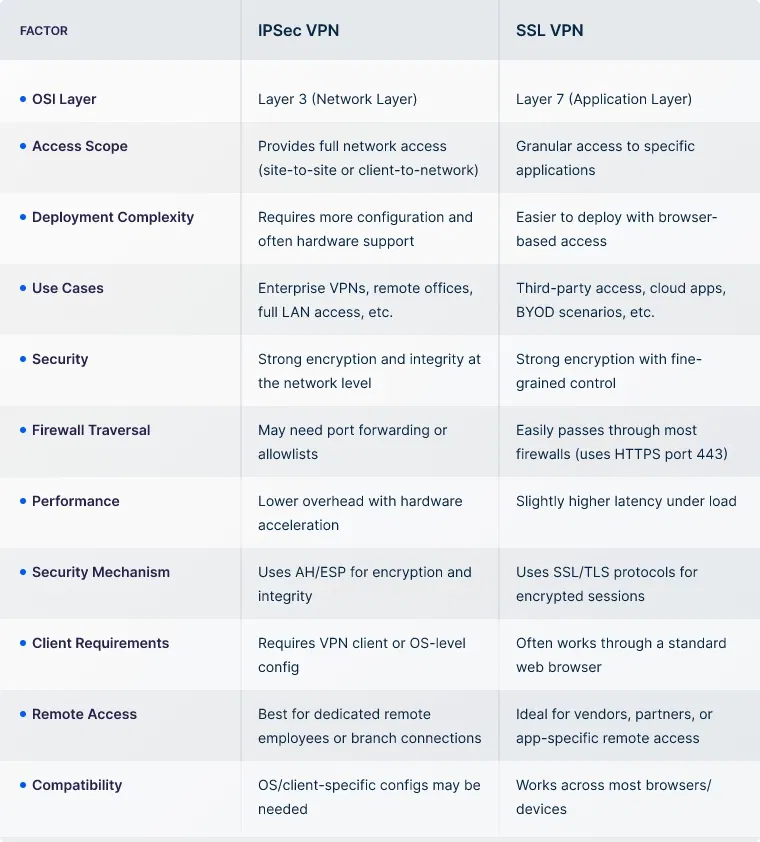
IPSec VPN and SSL VPN are two of the most commonly used protocols for secure remote access. They're often compared because both allow encrypted connections over public networks.
However, they differ in how they work, how they're deployed, and what they’re best suited for. The table below highlights the key differences to help you choose the right fit.
Before you proceed with IPSec VPN as your network security choice, it’s important to understand its strengths and limitations. This helps you make the right call, especially when choosing between different VPN architectures or considering long-term scalability.
UTunnel supports IPSec VPN through its Access Gateway solution, making it easy for businesses to deploy secure VPN servers in the cloud or on-premise. It simplifies common IPSec challenges like complex setup and manual routing by offering automated deployment, centralized configuration, and support for standard protocols like IKEv2 and OpenVPN.
Admins can manage site-to-site tunnels, assign static IPs, and apply security policies, all from the centralized dashboard. This approach brings the reliability of IPSec with modern usability for businesses that prefer familiar, protocol-driven VPN setups.
For organizations looking beyond traditional tunneling, UTunnel also offers MeshConnect. While not based on IPSec, it addresses scenarios where granular access control and dynamic environments are key. MeshConnect uses a Zero Trust approach to grant access at the resource level, helping prevent lateral movement and reducing overexposure.
By offering both Access Gateway and MeshConnect, UTunnel covers a broad range of secure connectivity needs, whether your priority is protocol-based tunneling or policy-based access control.
You need a VPN client and a VPN gateway that supports IPSec. Once the client is configured with the correct server address, authentication method, and shared keys or certificates, it can initiate a secure IPSec connection.
The two main types are Transport Mode and Tunnel Mode. Transport Mode secures only the data within the IP packet, while Tunnel Mode secures the entire packet by encapsulating it in a new one.
IPSec VPN secures traffic at the network layer, encrypting all IP packets between networks or devices. SSL VPN works at the application layer, typically accessed through a browser, and is used for remote access to specific apps or resources.
Yes, IPSec VPN is considered highly secure when properly configured. It uses strong encryption standards like AES and supports secure key exchange mechanisms to protect data.
IPSec typically uses UDP port 500 for IKE (Internet Key Exchange) and UDP port 4500 for NAT traversal. Protocols like ESP (IP protocol 50) may also be used for actual data transmission.
No, not all VPNs use IPSec. Some use alternatives like OpenVPN, WireGuard, or SSL/TLS depending on the use case, platform, and security requirements.

SCIM is a standard that helps you automate user account creation, up…
July 04, 2025

IP whitelisting is a method of controlling network access by allowin…
July 04, 2025
SAML authentication lets users log in once and access multiple busin…
July 04, 2025
