

What is SAML Authentication?
SAML authentication lets users log in once and access multiple busin…
 July 04, 2025
A static IP address is a permanent network address assigned to a device, making it easier to reach, manage, and secure over time. For businesses and organizations, having a static IP helps maintain reliable access to servers, enables secure remote work, hosts internal applications, and controls network resources without constant changes.
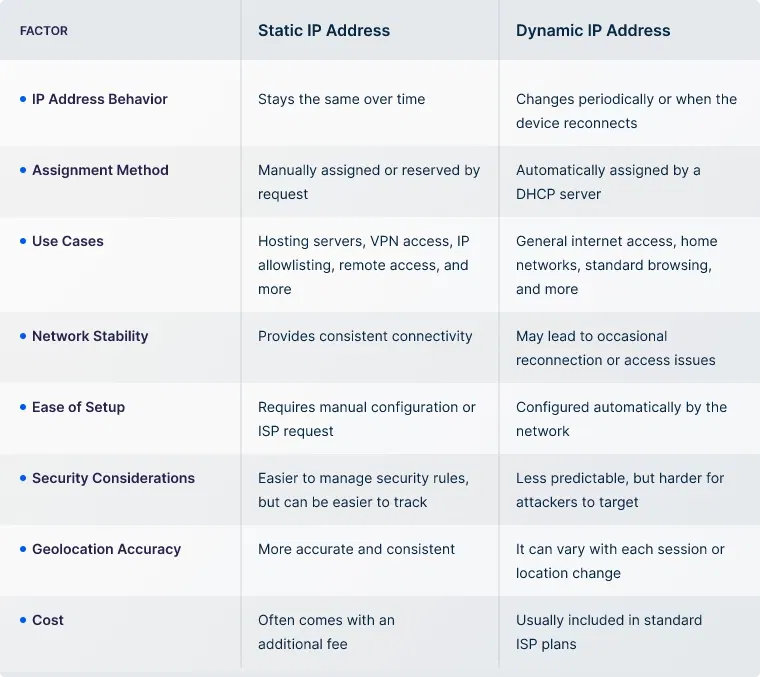
Static and dynamic IP addresses are often confused, especially when evaluating network options for business needs. Understanding the difference is key to choosing what best suits your business.
A public static IP address is assigned by your internet service provider and is accessible over the internet. It’s what allows clients, employees, or external services to connect to your business from the outside.
If you're hosting a website, a cloud service, a mail server, or enabling remote access via VPN, you'll likely need a public static IP. It gives your external-facing systems a consistent point of contact, which is essential for reliable uptime and reachability.
A private static IP address, on the other hand, is used for devices within your internal network, like office printers, local servers, or intranet apps. These IPs are not visible to the outside world. They’re mainly for organizing and controlling devices within your business, making sure every system has a fixed, predictable address inside your network.
The key difference lies in visibility and purpose:
A public static IP address gives your business a fixed online identity. It ensures the access remains predictable and secure. This capability makes it handy for use cases like remote access, IP whitelisting, managing secure external integrations, and more.
There are two main ways businesses typically get a static IP:
Many ISPs offer public static IPs as part of business plans. You can request one directly and then:
A faster way to get a static IP is by deploying a VPN server that includes one by default. No ISP request needed, the IP is assigned instantly during setup. Here are the steps:
Choose Provider: Select a VPN solution that includes dedicated static IP addresses with its server deployments. Look for providers that support clean IPs and business use cases.
If you believe a static IP is best for your business needs, here’s how to tell if it truly fits your setup. If the following points apply, a static IP address could be the right choice:
A static IP address provides predictability, which is often critical for smooth operation across distributed teams, hosted services, and security-sensitive environments.
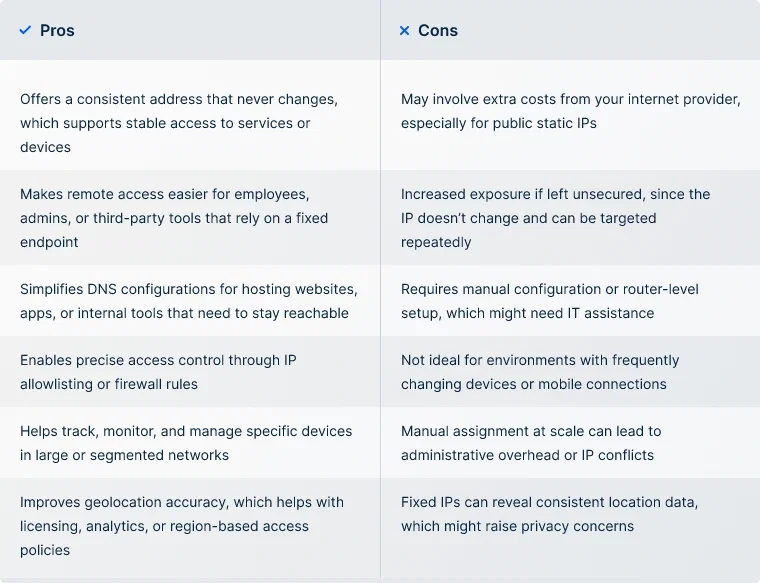
While a static IP is handy for many network setups, it isn’t always the right choice in every situation. Here’s a quick look at the pros and cons to help you decide whether it's right for your business.
Having a clean Static IP is important for businesses of any size, and UTunnel takes care of it. With UTunnel, no complex setup is required—the static IP that’s never shared or rotated is ready as soon as the VPN server is deployed.
This makes it especially useful for IP whitelisting, where businesses can restrict access to cloud services, SaaS platforms, or internal tools by allowing traffic only from this fixed IP. It’s also essential for enabling secure remote access and letting off-site employees connect through a trusted, verified endpoint.
Security teams can also configure firewalls or access control policies around the static IP to minimize exposure and reduce risk. Additionally, having a consistent IP address ensures smoother integration with APIs, databases, or systems that rely on IP-based authentication.
UTunnel’s platform supports:
Every UTunnel deployment includes a 14-day free trial and a 14-day money-back guarantee, allowing organizations to test capabilities before committing.
Not by itself. Static IPs can improve performance in some use cases, like hosting or remote access, but speed mostly depends on your network and service provider.
Restart your router and check if your IP changes. If it stays the same, it’s likely static. You can also confirm this with your ISP or VPN provider.
Costs vary. ISPs often charge a monthly fee, while VPN providers may include it as part of their plans or offer it as an add-on.
You can’t get a public static IP without working through a provider, but VPN services can offer one that works similarly for most needs.
Yes. Some VPN services offer static or dedicated IP addresses that remain fixed each time you connect, which is useful for remote work or IP allowlisting.
SAML authentication lets users log in once and access multiple busin…
July 04, 2025

A cloud firewall is a security solution that helps filter and monito…
June 12, 2025

IP whitelisting is a method of controlling network access by allowin…
July 04, 2025
